
How To Ace an Interview with Speakfect
A step-by-step walkthrough — with real app screenshots — of using Speakfect to prepare for any interview. We use an Engineering Manager interview as the example: profile, goal, drills, simulated interview, debrief, and progress tracking.
Published Updated
This guide walks through every step of Speakfect's interview prep flow using an Engineering Manager role as the example — but the same loop applies to any interview: software engineer, product manager, sales, or anything else. The questions, coaching, and feedback all adapt to whatever role and company you fill in.
EM interviews are harder to prepare for than most. The questions are open-ended — "tell me about a time you had to navigate a difficult stakeholder" — and the interviewer is evaluating your judgment, communication clarity, and leadership presence simultaneously. Reading about STAR method helps, but it's not a practice rep. Here's how to build a real practice loop in Speakfect, with screenshots from the actual app at every step.
Download on the App Store → Get it on Google Play →
Step 1 — Set your profile to Engineering Manager
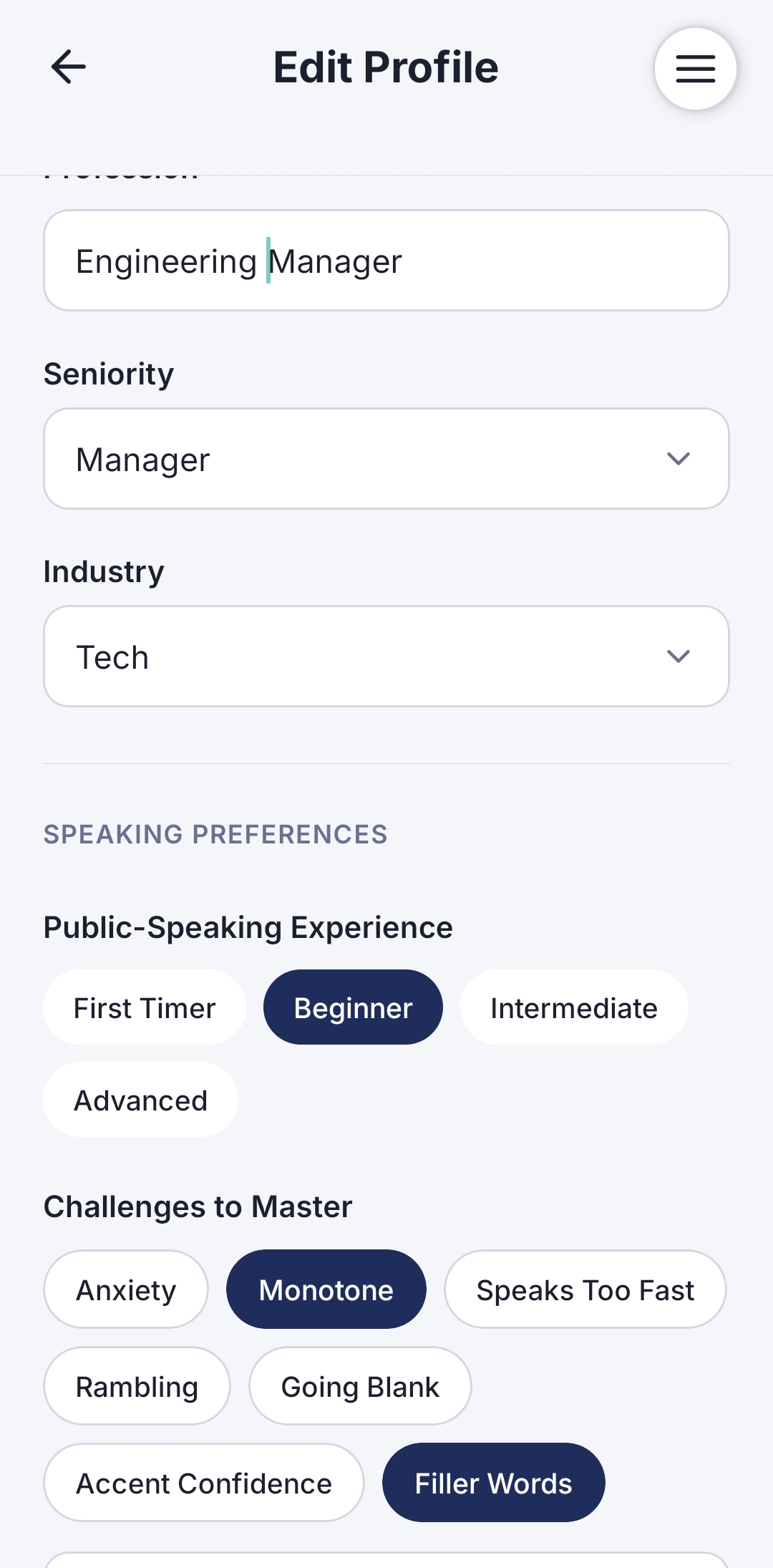
Open Edit Profile and set Profession to Engineering Manager, Seniority to Manager, and Industry to Tech. These three fields unlock the app's hyper-personalized experience — every drill topic, every simulated interview question, and every coaching note gets calibrated to what an EM at your level actually needs to work on.
Under Challenges to Master, flag the ones that trip you up in real interviews. Monotone and Filler Words are the two most common EM interview killers — a well-structured answer delivered in a flat, hedging way still loses to a more confident delivery. Flag what's real for you.
Step 2 — Set your goal — with context
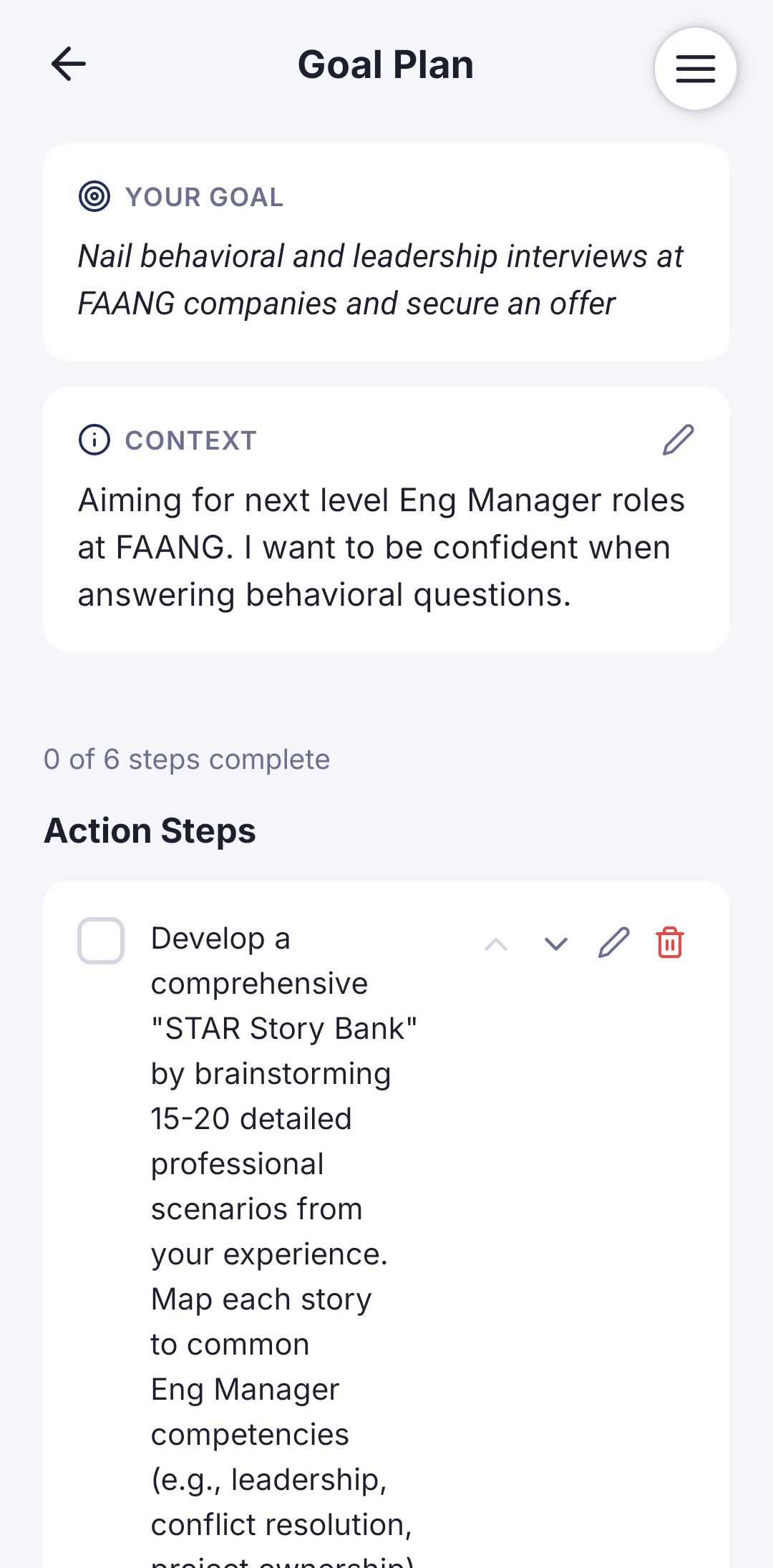
On Goal Plan, name your actual target: something like "Nail behavioral and leadership interviews at FAANG companies and secure an offer." That's a real goal — not a topic, not a vague intention.
Then add Context. This is the field most people skip, and it's the most valuable one in the app. Write specifically what you're working toward: "Aiming for next-level Eng Manager roles at FAANG. I want to be confident when answering behavioral questions." That context is what drives Speakfect's AI-generated action steps — instead of a generic "practice STAR method" checklist, you get a plan built around your specific situation, including a prompt to develop a 15–20 story STAR story bank mapped to core EM competencies like leadership, conflict resolution, and project ownership.
Step 3 — Build delivery with Drills
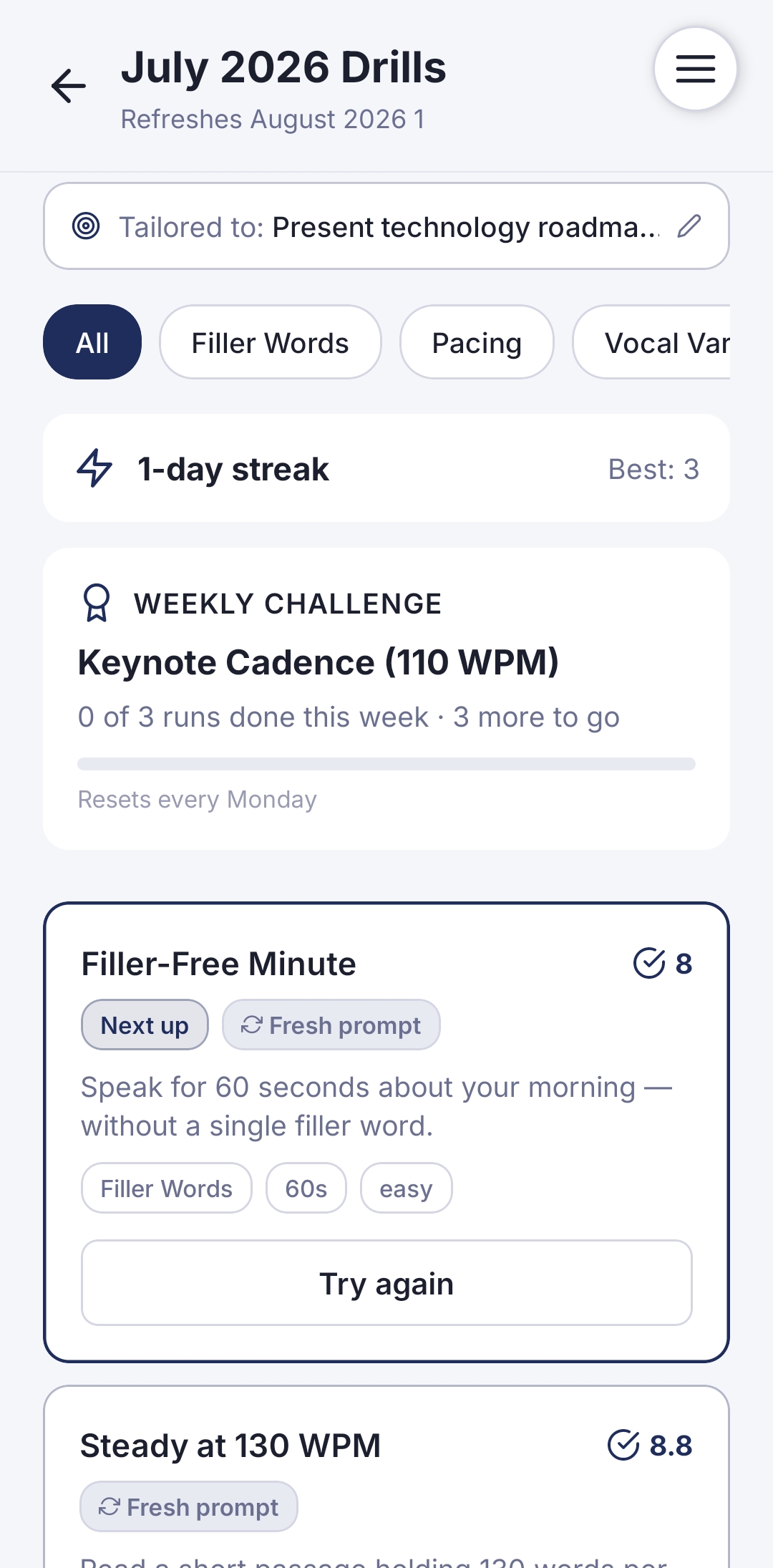
Before your first full mock interview, do a few Drills to sharpen your delivery mechanics. These are 60–120 second exercises — short enough that "just do one" doesn't feel like a commitment, but targeted enough to move real needles.
With your EM goal set, drills are tailored to your context: the weekly challenge, the prompt topics, the difficulty framing all reflect what an EM needs to nail. A Filler-Free Minute drill — speak for 60 seconds without a single filler word — is the single best warm-up before a mock interview session. Run it before you open Simulated Interview.
Step 4 — Launch your Simulated Interview
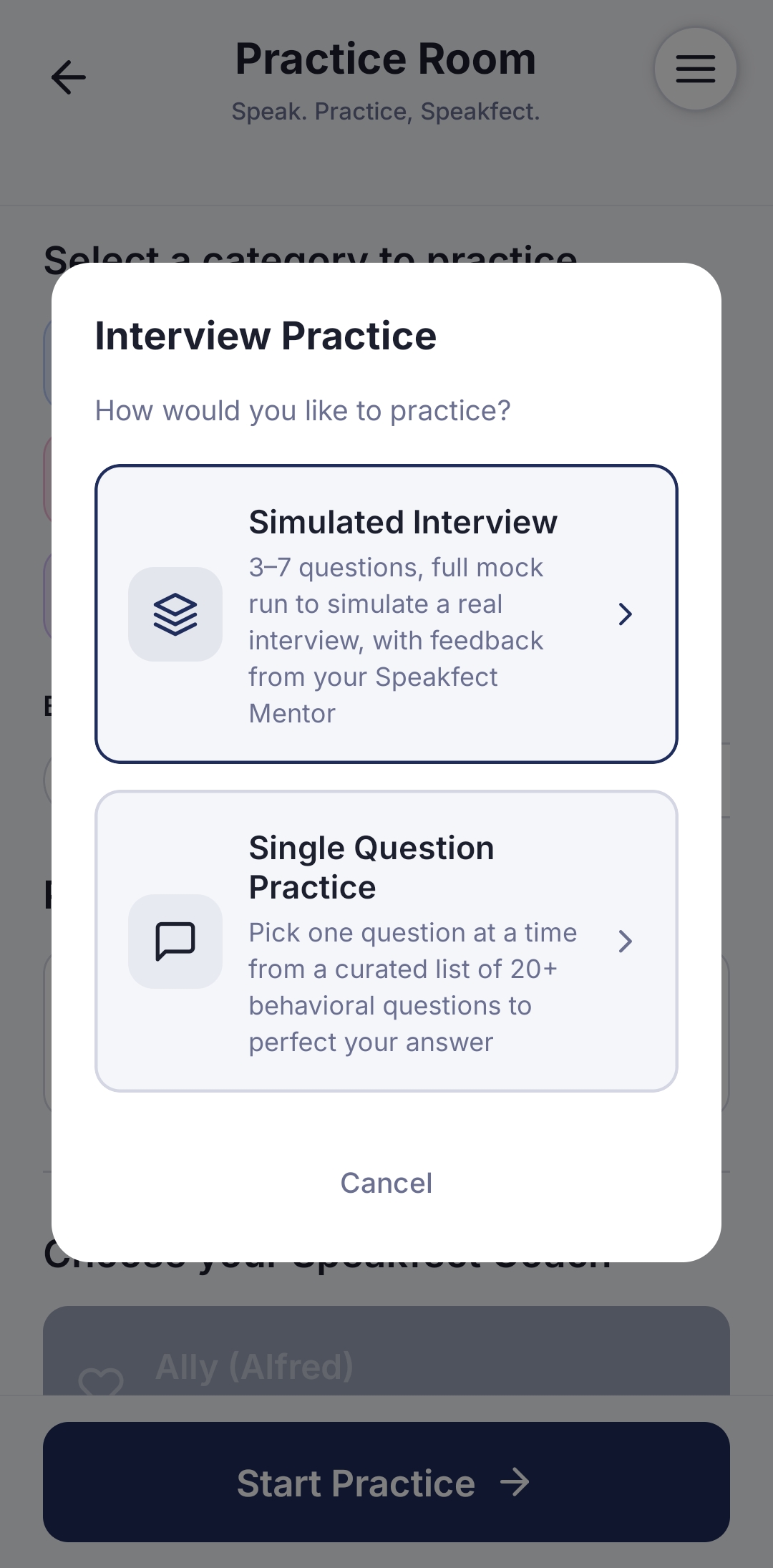
This is the heart of Speakfect's EM prep. From the Practice Room, tap Interview Practice and choose Simulated Interview — a full 3–7 question mock run, coached by your Speakfect Mentor, designed to simulate a real interview loop from start to finish.
The alternative — Single Question Practice — is useful for drilling a single answer, but for EM prep the Simulated Interview is where you build the real skill: sustaining confidence, clarity, and leadership presence across a full set of questions, not just one.
Step 5 — Configure the interview for your real target role
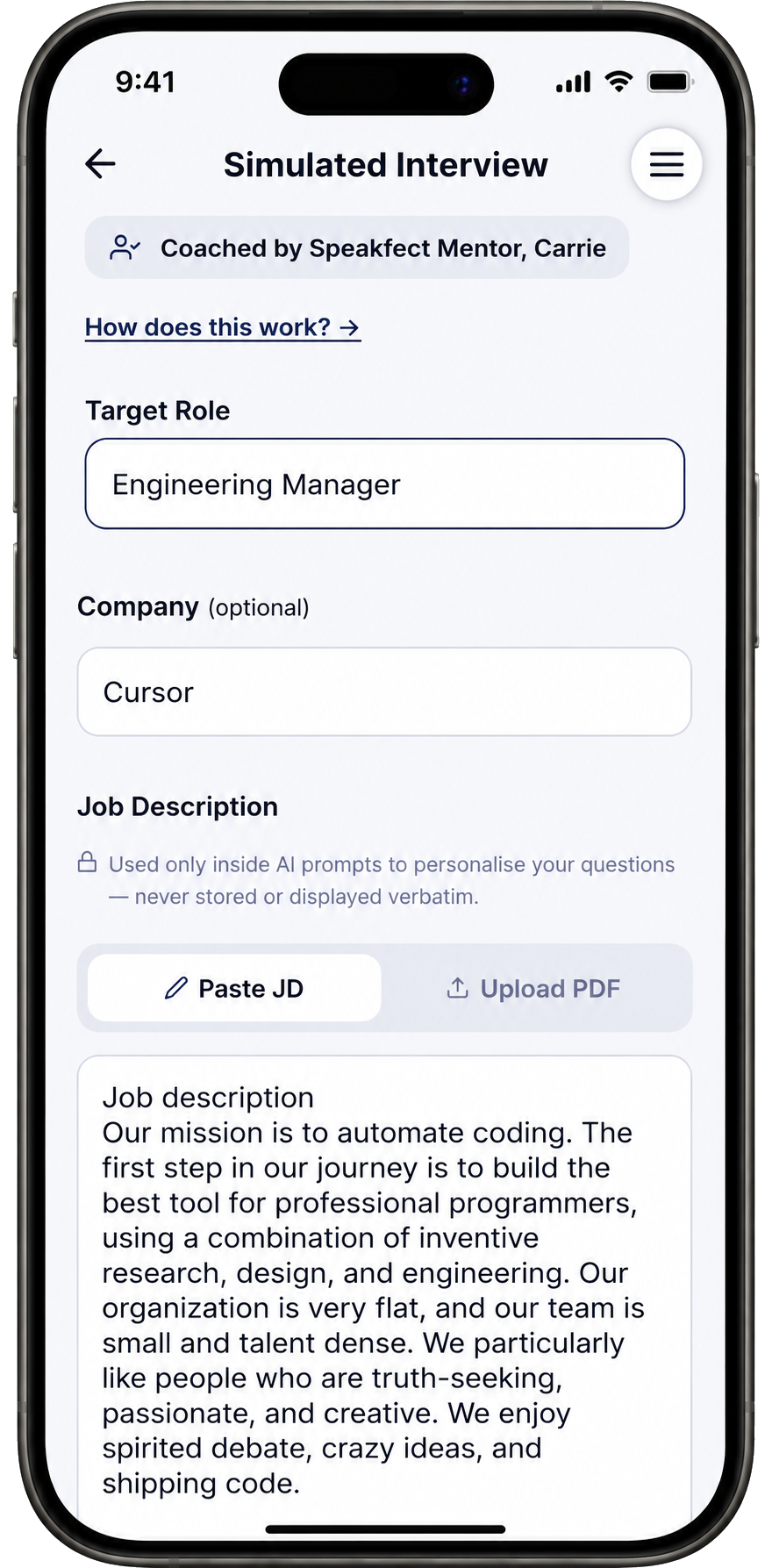
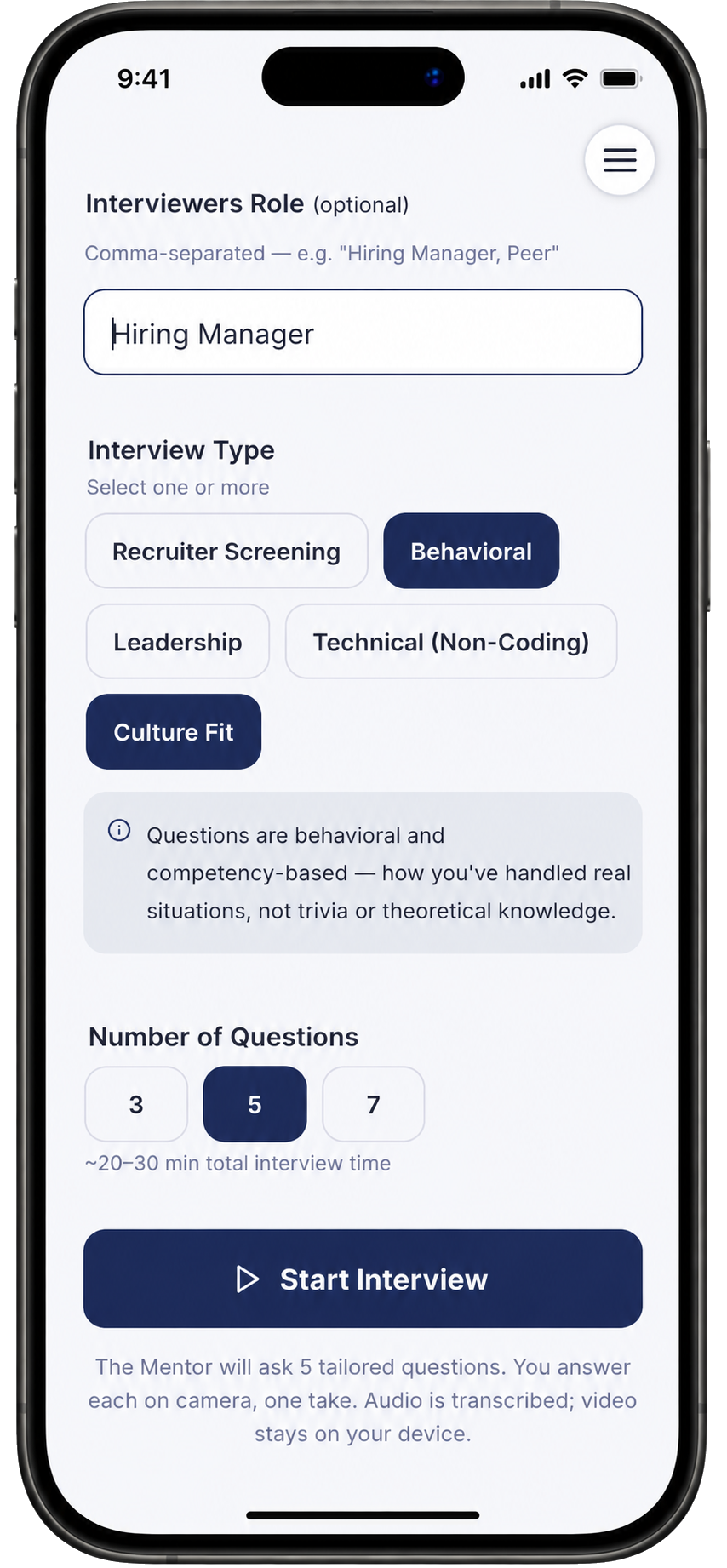
The setup screen is where Speakfect's personalization happens. Fill in all three fields:
- Target Role — be specific: "Engineering Manager" not just "Manager." The more precise, the more targeted your questions.
- Company — adding the real company (e.g. Cursor) switches the question style from generic leadership prompts to company-specific culture-fit and vision alignment questions. This is the difference between "how do you handle conflict?" and a question grounded in that company's actual values and team structure.
- Job Description — paste the full JD. Speakfect uses it only inside AI prompts to tailor your questions; it's never stored or displayed verbatim. This is what enables questions like "given the highly cross-functional nature of this role and the importance of balancing execution speed with long-term technical quality for millions of developers" — the specificity comes from your JD, not from a generic template.
Your coach (visible at the top — "Coached by Speakfect Mentor, Carrie") is already set from your Coaching Preferences. The Mentor is the right persona for EM prep: balanced, growth-focused notes on both your leadership judgment and your delivery.
Step 6 — Answer questions grounded in the real role
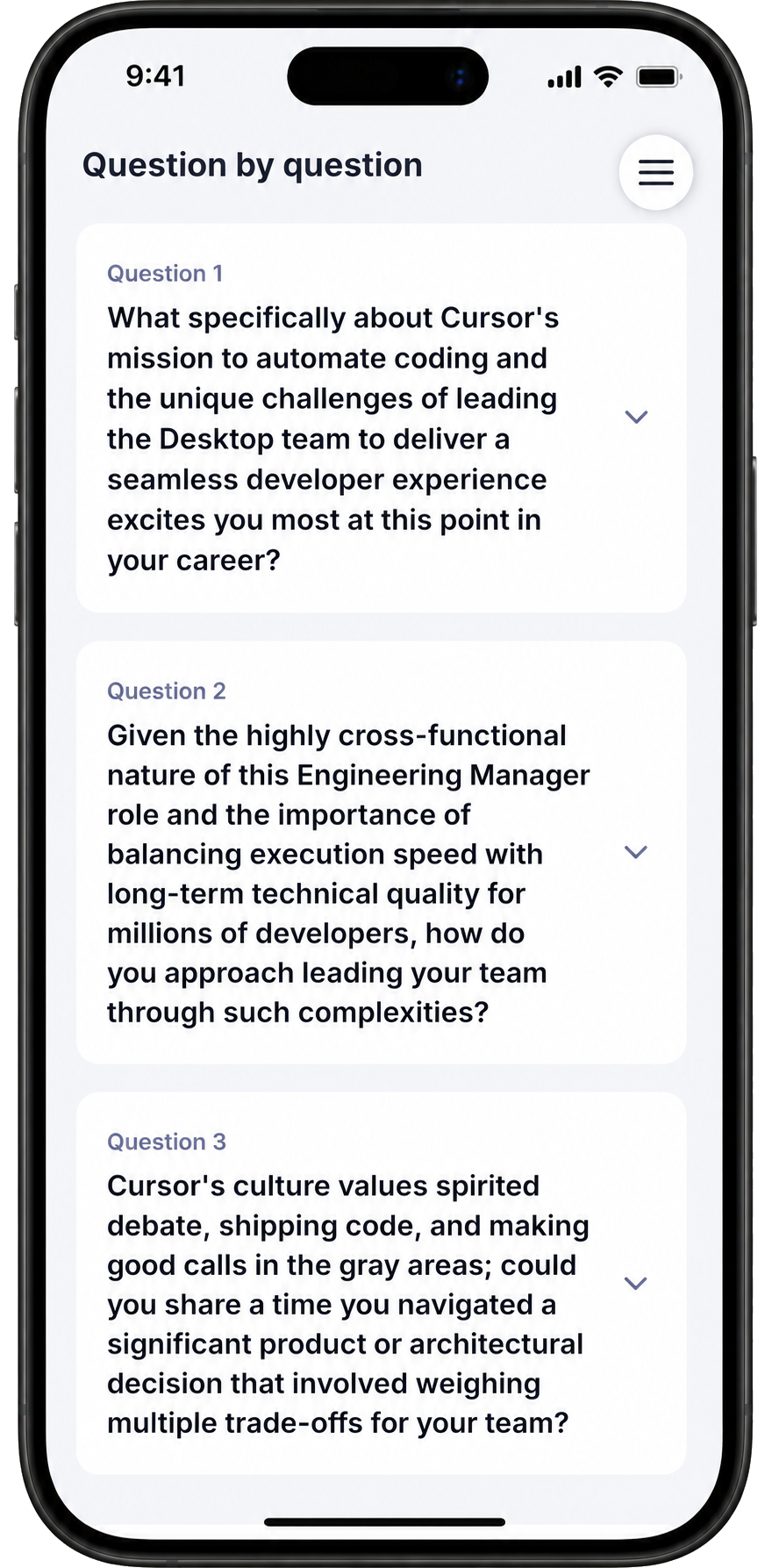
Once you start, Speakfect generates questions from your JD, company, and role — not a generic bank. You'll see real EM-level questions grounded in the actual position, delivered one at a time:
- "What specifically about Cursor's mission to automate coding and the unique challenges of leading the Desktop team to deliver a seamless developer experience excites you most at this point in your career?"
- "Given the highly cross-functional nature of this Engineering Manager role and the importance of balancing execution speed with long-term technical quality for millions of developers, how do you approach leading your team through such complexities?"
- "Cursor's culture values spirited debate, shipping code, and making good calls in the gray areas — could you share a time you navigated a significant product or architectural decision that involved weighing multiple trade-offs for your team?"
These aren't generic. They're built from what you gave the app. Answer each one like you're in the room — the recording runs, captures your audio and video, and moves to the next question when you're ready.
Step 7 — Review your Interview Debrief and scores
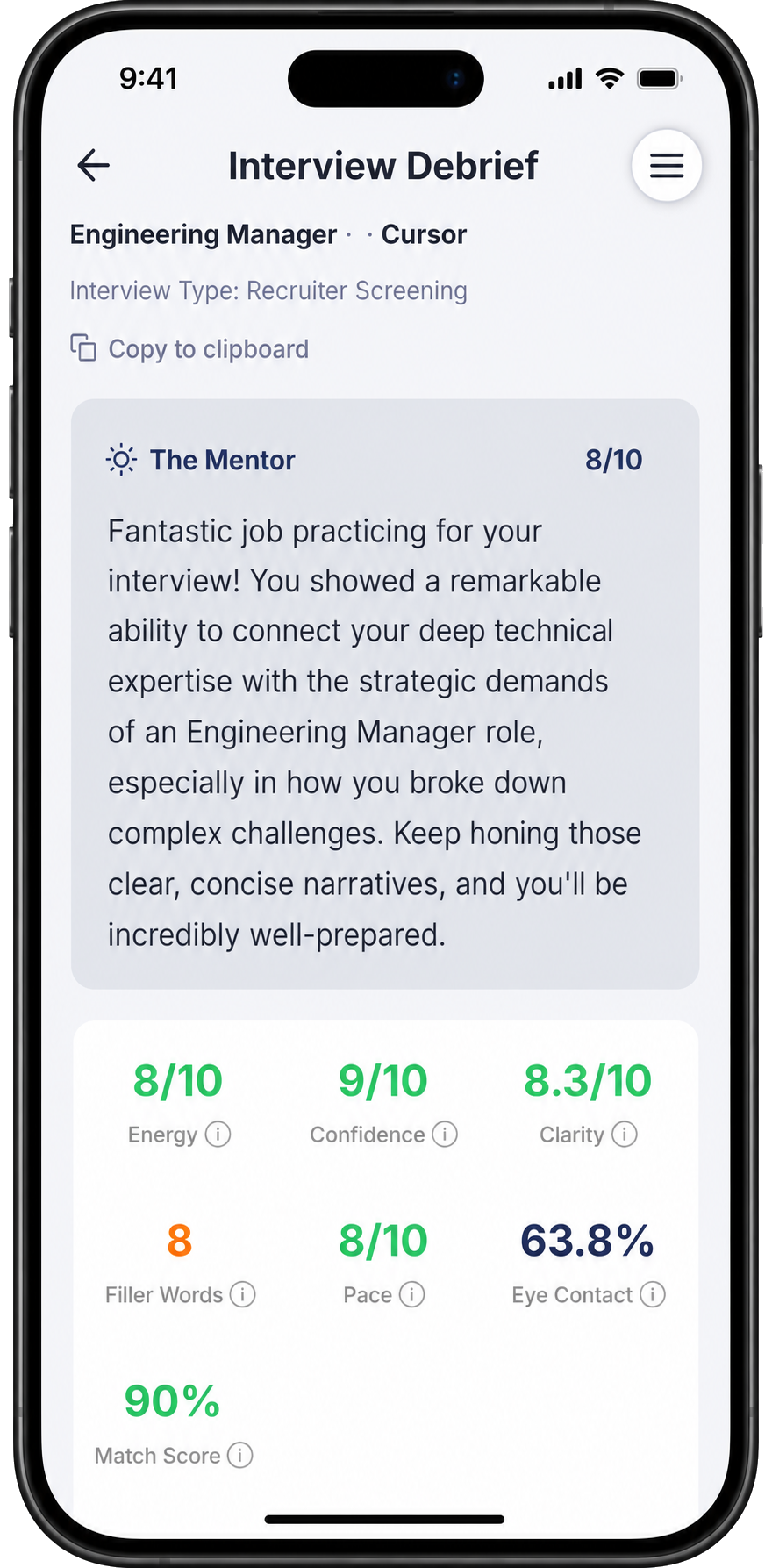
After the session, you get a full Interview Debrief — scored by your Mentor across every dimension that matters in an EM interview:
- Energy: 8/10
- Confidence: 9/10
- Clarity: 8.3/10
- Filler Words: 8
- Pace: 8/10
- Eye Contact: 63.8%
- Match Score: 90% — how well your answers matched the role's requirements based on the JD
The Mentor's summary is what to read first: "Fantastic job practicing for your interview! You showed a remarkable ability to connect your deep technical expertise with the strategic demands of an Engineering Manager role, especially in how you broke down complex challenges." That's the qualitative read on what landed — and what to sharpen.
Step 8 — Read the full feedback
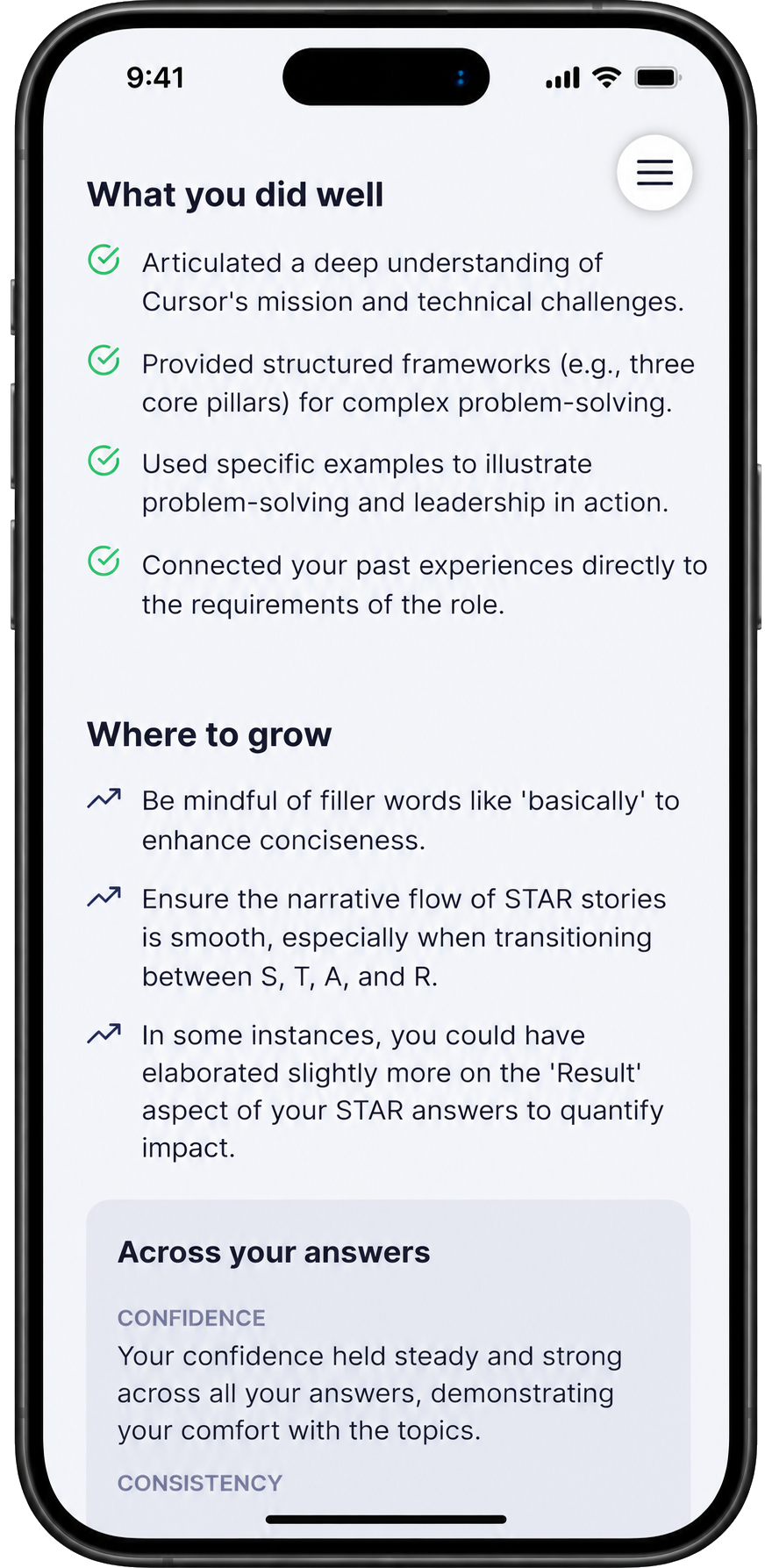
Below the scores, the What you did well section and Where to grow section give you the actionable read on your specific answers:
What you did well:
- Articulated a deep understanding of Cursor's mission and technical challenges
- Provided structured frameworks (e.g., three core pillars) for complex problem-solving
- Used specific examples to illustrate problem-solving and leadership in action
- Connected past experiences directly to the requirements of the role
Where to grow:
- Be mindful of filler words like 'basically' to enhance conciseness
- Ensure the narrative flow of STAR stories is smooth, especially when transitioning between S, T, A, and R
- In some instances, elaborate slightly more on the 'Result' aspect of your STAR answers to quantify impact
The Across your answers section gives a cross-answer pattern read — confidence held steady throughout, consistency flagged where it varied. This is the layer of feedback that only emerges across a full set of questions, not a single rep.
Step 9 — Ask your Mentor for targeted help
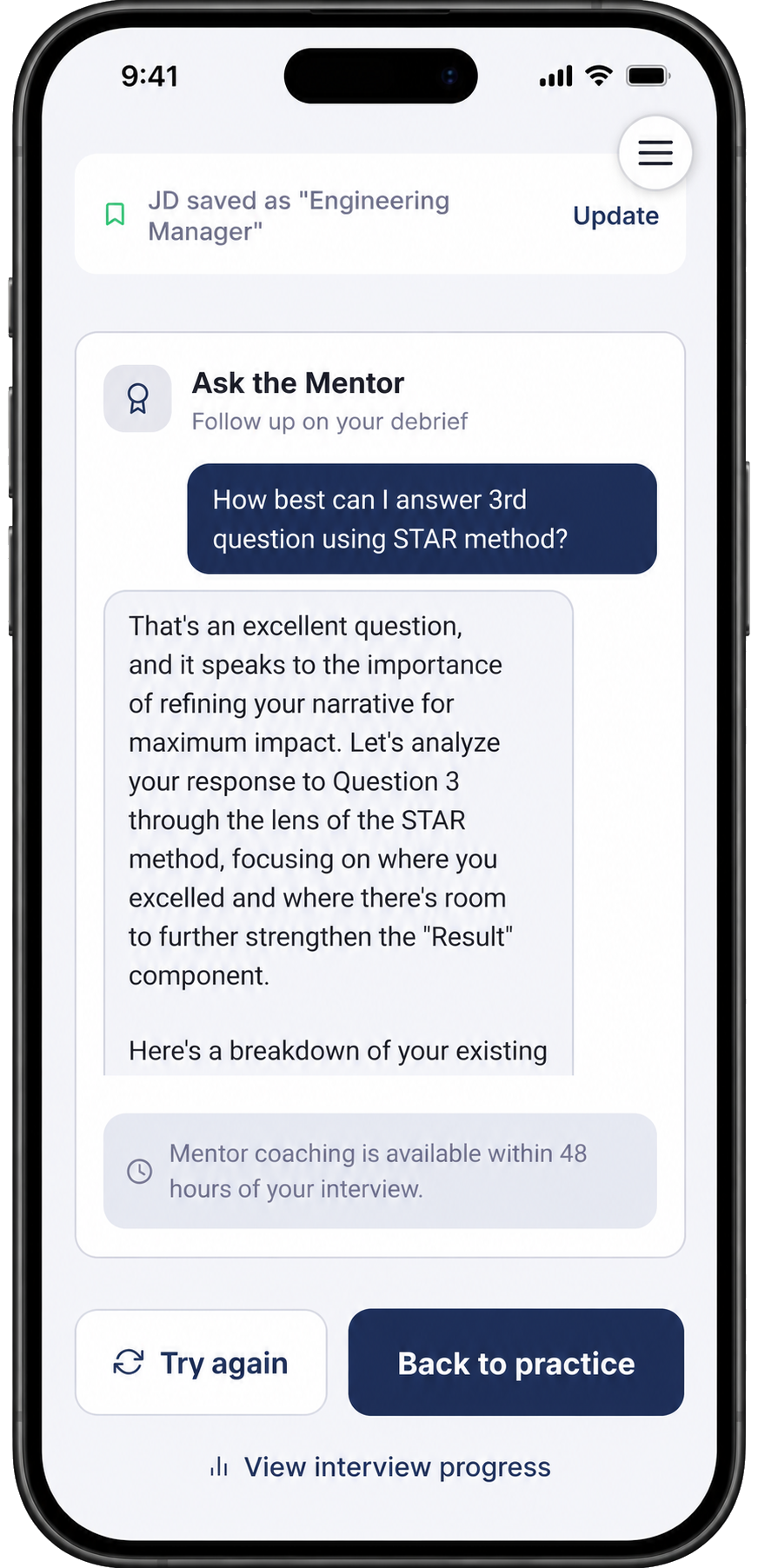
After debriefing, open Ask the Mentor directly from the debrief screen. Your Mentor has full context on your session and can go deeper on anything: "How best can I answer the 3rd question using STAR method?"
The response isn't generic advice — it's a breakdown of your specific answer to Question 3, analyzing where your STAR structure held and where the Result component needed more specificity to quantify impact. This is where improvement happens fastest: targeted, session-aware coaching on the exact question that felt weakest.
Mentor coaching is available within 48 hours of your interview, so use it the same day while the answers are still fresh.
Step 10 — Track your score trend across sessions
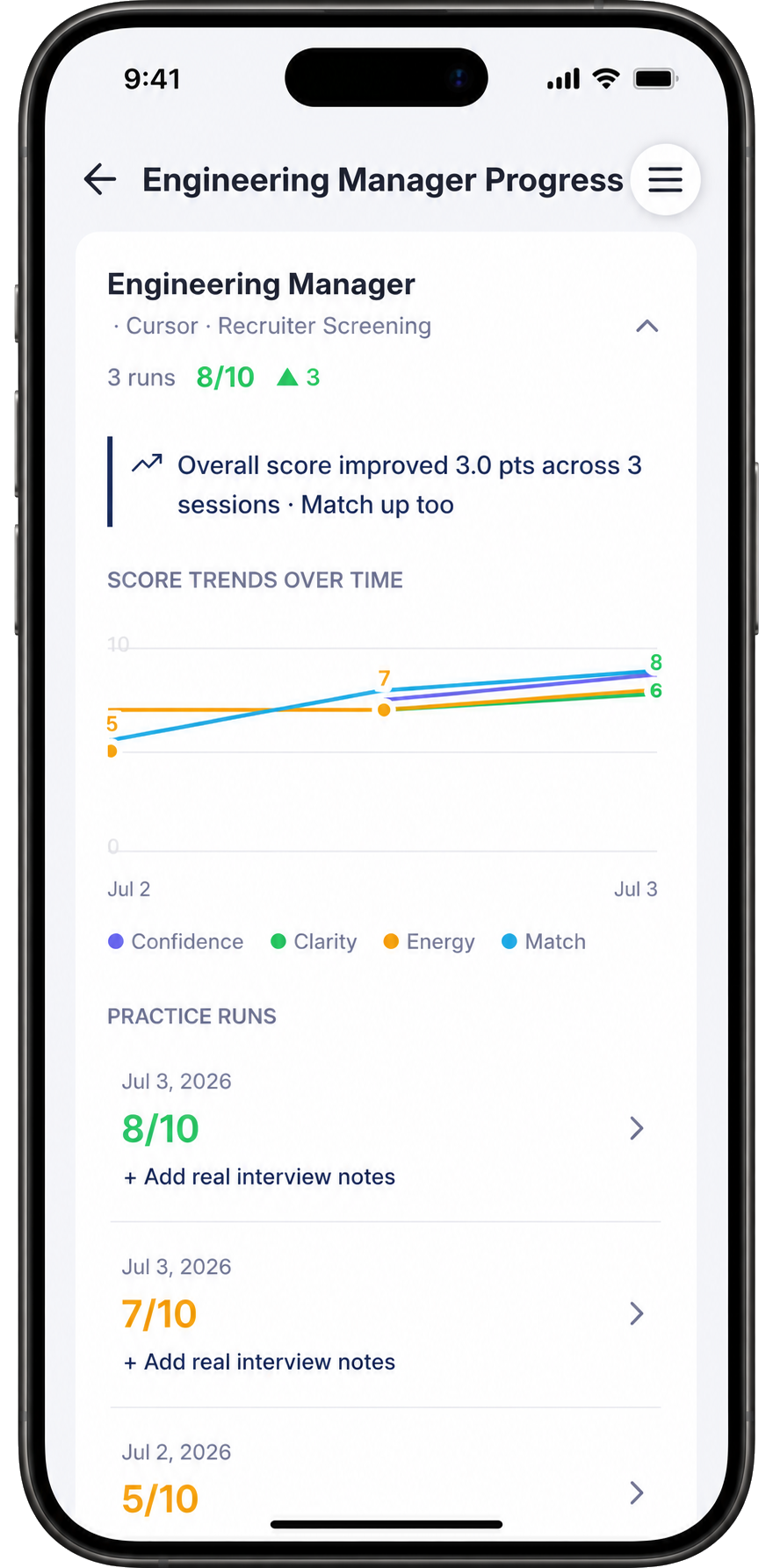
Open View Interview Progress from the debrief screen to see your score trajectory across all your Engineering Manager · Cursor runs. After 3 sessions, the trend is clear: overall score improved 3.0 points, from 5/10 on the first run to 8/10 on the latest.
The Score Trends Over Time chart shows Confidence, Clarity, Energy, and Match Score as separate lines — you can see exactly which dimension is improving fastest and which still needs work. For most EM candidates, Confidence and Match Score improve quickly once the JD is set correctly, while Clarity takes more reps to sharpen.
Each practice run is listed with its date and score, and you can tap into any run to see the full debrief again — useful for comparing what changed between your first and latest attempt.
Step 11 — View all your simulated interview progress
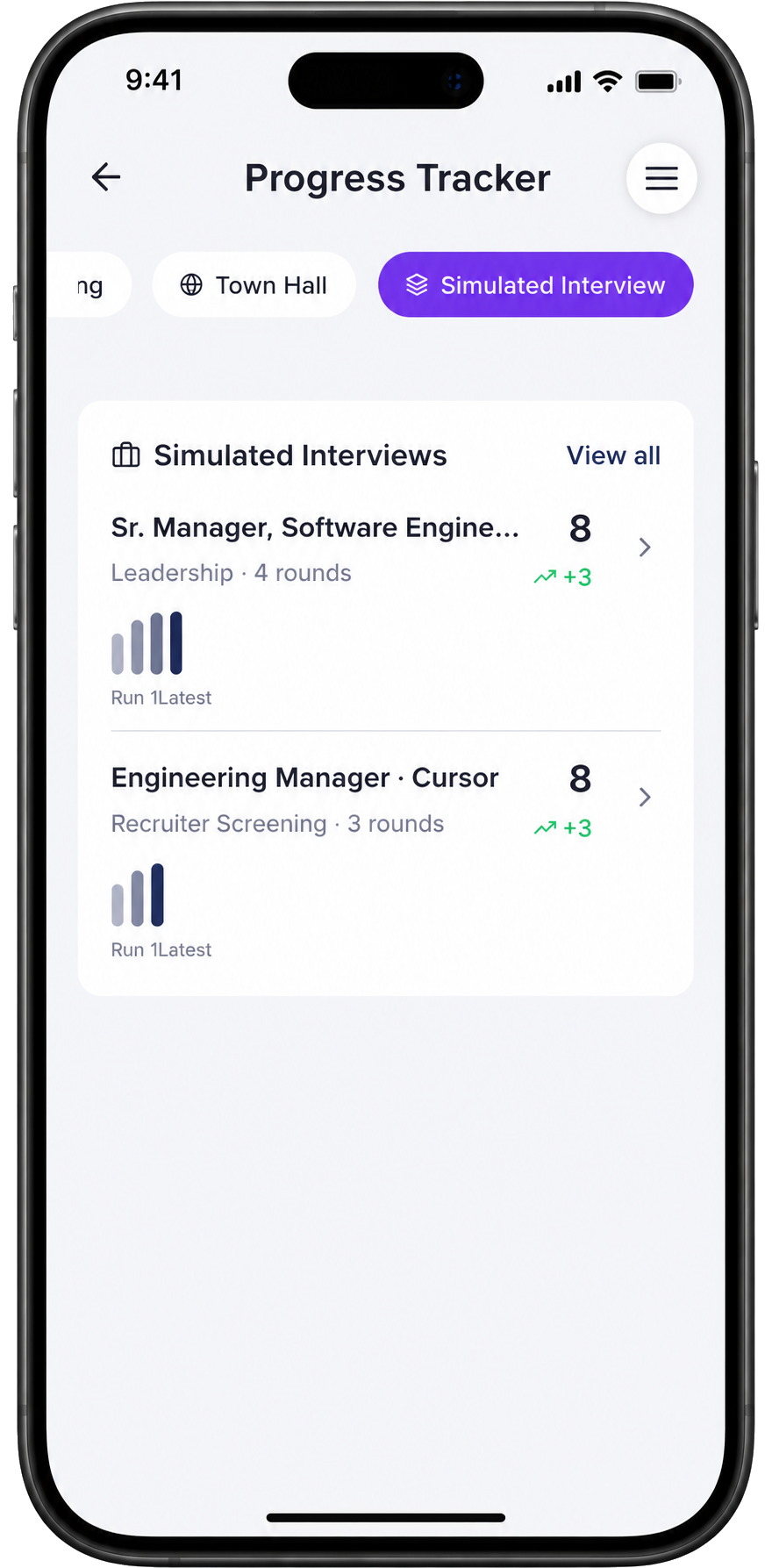
The Progress Tracker in the Simulated Interview tab shows every role you've practiced for, side by side. You can track multiple target roles at once — useful if you're interviewing at several companies or for different EM levels simultaneously.
The Engineering Manager · Cursor track shows 3 rounds, score 8, with a +3 improvement. Each track has its own run-by-run bar chart so you can see momentum building visually. When a bar chart is trending up, that's the signal to schedule the real interview.
What changes after 3–5 full mock sessions
Three things shift measurably after a week of daily Simulated Interview sessions: your STAR stories become tighter because you've had to say them out loud and heard the debrief on where they ran long or thin; your delivery confidence rises because the physical experience of answering on the spot stops feeling like an emergency; and your Match Score climbs as you learn how to connect your specific experience to the specific language and values of the role. None of this comes from re-reading your notes — it comes from reps.
Frequently asked
Should I paste the actual job description? Yes — it's used only inside AI prompts to tailor your questions and is never stored or displayed verbatim. The more complete the JD, the more specific your questions.
How many sessions before I'm ready for the real interview? Most people feel meaningfully more prepared after 3 full sessions. The progress chart will tell you when your scores plateau — that's when you're ready.
Can I practice for multiple companies at once? Yes. Set up a separate Simulated Interview for each role — each gets its own JD, company context, and progress track. The Progress Tracker shows all of them in one view.
What's the difference between Simulated Interview and Single Question Practice? Simulated Interview runs 3–7 questions in sequence, mimicking a real loop — it trains your ability to sustain performance across a full interview. Single Question Practice lets you drill one specific question repeatedly until it's locked in. Use both: drills and single question practice to warm up, Simulated Interview to measure readiness.
For the full behavioral interview playbook — question frameworks, STAR structure, and EM-specific strategy — visit the Interview Practice hub. Or head back to all How-To Guides.
More in this track
- How To Overcome Fear of Public Speaking with SpeakfectA step-by-step walkthrough — with real app screenshots — of using Speakfect to build public speaking confidence: profile, goal, drills, coach, and progress tracking.
- How To Prepare a Confident Townhall Presentation with SpeakfectA step-by-step walkthrough — with real app screenshots — of prepping a company all-hands in Speakfect: profile, goal plan, drills, custom practice, AI coaching, Mock Q&A across four audience types, and progress tracking.
- How To Practice Your Best Man Speech with SpeakfectA step-by-step walkthrough — with real app screenshots — of rehearsing a best man speech in Speakfect: set your goal, practice on camera, read your score, and improve round by round.